How to Build an Apollo MCP Server in 10 Minutes and Connect AI to NASA’s API
Introduction
What if you could give your AI assistant the ability to browse NASA’s image library, fetch today’s Astronomy Picture of the Day, and pull live product data — all in under 10 minutes, without writing a single custom backend integration?
That’s not a hypothetical. It’s exactly what Apollo MCP Server makes possible, and in this tutorial, we’ll walk through the full process step by step.
By the end, you’ll have a running MCP server connected to GitHub Copilot (or any AI client) that can query real NASA data live through GraphQL.
🚀 Complete JavaScript Guide (Beginner + Advanced)
🚀 NodeJS – The Complete Guide (MVC, REST APIs, GraphQL, Deno)
What is MCP (Model Context Protocol)?
MCP stands for Model Context Protocol — an open standard that defines how applications provide context and data access to AI models and LLMs.
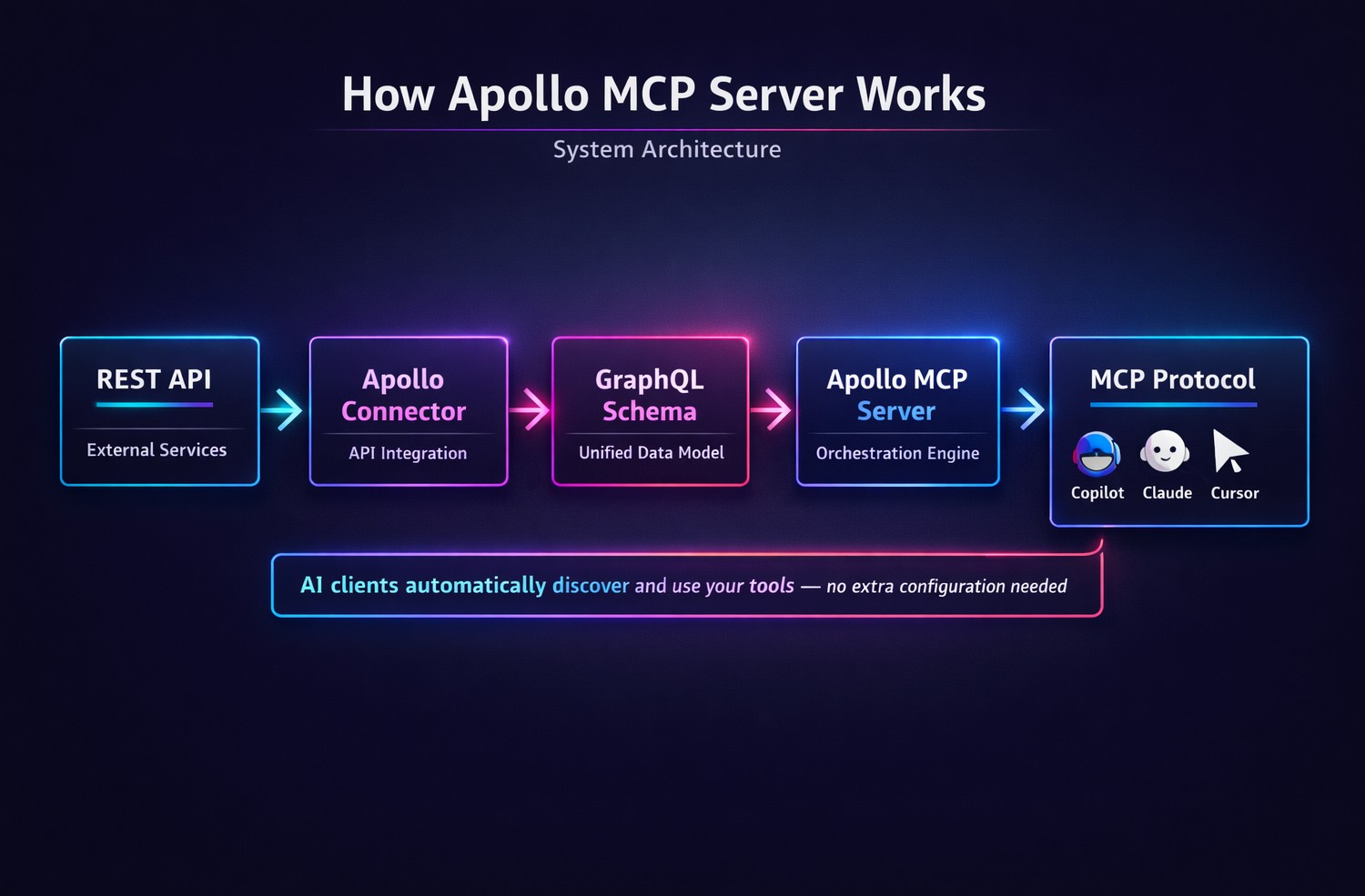
Rather than building one-off integrations for every external API your AI needs to touch, MCP standardizes the interface. Any compatible AI client — Copilot, Claude, Cursor, Goose — can discover your tools and use them without additional configuration.
Think of it as a universal adapter between AI and the real world.
What is Apollo MCP Server?
Apollo MCP Server is a specific implementation of the MCP protocol built around GraphQL. It exposes your GraphQL API operations as MCP tools that AI clients can call directly.
Here’s why that matters:
- Speed: Connect AI to any GraphQL API in minutes, not days
- Safety: GraphQL’s type system makes AI data access structured and predictable
- Discoverability: LLMs can introspect your schema and automatically find the right tool for a given task
- Flexibility: Works with any MCP-compatible AI client
Why Use GraphQL as the Data Layer for AI?
GraphQL is particularly well-suited to AI integration for a few key reasons:
1. Explicit data relationships GraphQL schemas define how data types relate to each other. AI agents don’t need to guess — the schema tells them everything they need to know.
2. Precise queries AI can request exactly the fields it needs, reducing noise in responses and making outputs more reliable.
3. Apollo Connectors Apollo’s connector system lets you translate existing REST API endpoints into GraphQL types and queries — without rewriting your backend. This means your existing APIs become AI-accessible in minutes.
Step-by-Step: Building Your Apollo MCP Server
Step 1: Install Rover CLI
Rover is Apollo’s command-line interface for scaffolding and managing MCP servers.
- macOS: Install via terminal following the Apollo documentation
- Windows: Install via PowerShell, but run Rover in Command Prompt
Step 2: Set Up Apollo Studio
Create a free account at studio.apollographql.com. You’ll need to:
- Create an organization
- Generate an API key
- Configure Rover with your key using
rover config auth
Step 3: Scaffold the MCP Server
Run rover init and select:
- Template: Create MCP tools from a new Apollo GraphQL project
- Starting template: Apollo graph with connectors to connect REST API services
- Project name: Your choice (e.g.,
my-first-apollo-mcp-graph)
Step 4: Start the Server
Run rover dev to start your local development environment. You’ll get:
- A GraphQL API running on
localhost:4000 - An MCP server running in streamable HTTP mode on
localhost:8000
Note: If you encounter an
unknown field: descriptionerror, comment out thenameanddescriptionfields in yourmcp.local.ymlconfiguration file.
Step 5: Inspect Your MCP Tools
Run the MCP Inspector using:
bash
npx @modelcontextprotocol/inspector http://127.0.0.1:8000/mcp
Connect to your server and explore the default tools: Execute, Introspect, Search, and Validate.
Step 6: Connect REST APIs via Apollo Connectors
Apollo Connectors let you map REST API endpoints to GraphQL types. For NASA’s APIs:
Astronomy Picture of the Day:
- Source:
api.nasa.gov/planetary/apod - Define a
AstronomyPhotoOfTheDaytype with fields liketitle,explanation,url,hdurl - Create a query
astronomyPhotoOfTheDay(date: String)mapped to the endpoint
NASA Image & Video Library:
- Source:
images-api.nasa.gov/search - Define types:
NASAImageData,NASAImageLink,NASAImageItem - Create a query
searchNASAImages(q: String!, mediaType: String, page: Int, pageSize: Int)
Step 7: Save Operations as MCP Tools in Apollo Studio
In Apollo Studio, navigate to Operation Collections and save your queries under Default MCP Tools. These saved operations automatically become callable tools in your MCP server.
For each tool, you can add:
- A descriptive name (e.g.,
getProducts,astronomyPhotoOfTheDay,searchNASAImages) - A description so the LLM knows when to use the tool
Step 8: Connect to GitHub Copilot (or Any AI Client)
In your VS Code project folder, create an mcp.json file:
JSON
{
  "servers": {
    "apollo-mcp": {
      "command": "npx",
      "args": ["mcp-remote", "http://127.0.0.1:8000/mcp"]
    }
  }
}
Open GitHub Copilot in VS Code and ask: “What tools do you have available?”
You’ll see your Apollo MCP tools listed alongside the default Copilot tools.
Live Demo: AI Fetching Real NASA Data
With the MCP server connected, here’s what you can now do with plain natural language:
- “Show today’s NASA image of the day” → Copilot calls
astronomyPhotoOfTheDay, returns the image URL, and opens it in your browser - “What was yesterday’s NASA image of the day?” → Copilot introspects the schema, finds the right tool, calls the API with yesterday’s date
- “Search for two pictures of Mars” → Copilot calls
searchNASAImages, returns two Mars photos, and opens them in the browser
Zero additional code. Zero custom integration. Just GraphQL, MCP, and an AI client doing exactly what you’d expect.
Key Takeaways
- MCP is the future of AI-to-API integration — any developer building AI agents needs to understand this protocol
- Apollo MCP Server makes GraphQL APIs instantly AI-accessible — your existing GraphQL API can become an AI toolset in minutes
- Apollo Connectors bridge the REST-to-GraphQL gap — no need to rewrite your backend
- GraphQL’s type system makes AI behavior more predictable — structured schemas reduce hallucinations and errors in AI-driven queries
- AI clients can introspect your schema automatically — even without predefined tools, LLMs can explore and query your API intelligently
Conclusion
The combination of MCP, Apollo, and GraphQL represents a genuinely new paradigm for AI development. The days of spending days writing custom AI-to-API integrations are over. With the right tooling, you can go from zero to a fully AI-connected data layer in the time it takes to make a coffee.
If you’re building with LLMs, AI agents, or any kind of AI-powered product, Apollo MCP Server deserves to be in your toolkit.